
When a laptop battery is dead or damaged, it can be expensive to send your device back to Apple for a battery replacement, but you can always buy a BatteryMall.com battery and have it replaced at home. We will provide step-by-step instructions for replacing the battery.
Matters needing attention
Turn off and disconnect the power supply before disassembly.
Be sure to follow the steps and do not remove the original battery forcefully, otherwise it will cause the touchpad to deform, damage and burn the original battery.
1. To protect your monitor, place a piece of aluminum foil between the monitor and the keyboard to prevent the remover from damaging the screen.
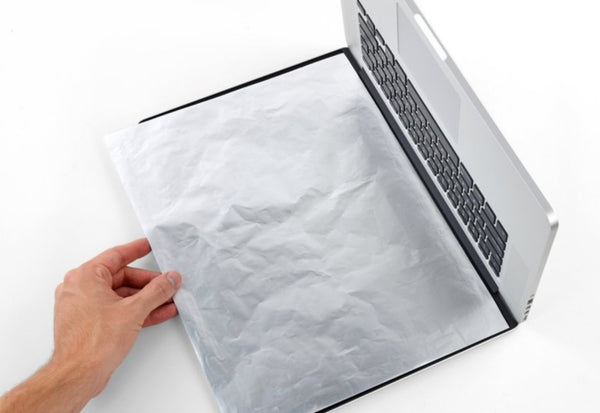
2. Then use a screwdriver to remove the screws on the top of the back, please keep the screws well to avoid loss.

3.Lift the lower shell from the MacBook Pro by lifting it from the edge closest to the cover.

4.During the reloading process, push down the center of the case and reconnect the case to its two plastic clips.

5.Remove the cover battery connector

6.Pry out each side of the head-up battery connector from the slot on the mainboard.
Bend the connector toward the battery to ensure that the battery connector does not accidentally touch the logic board.
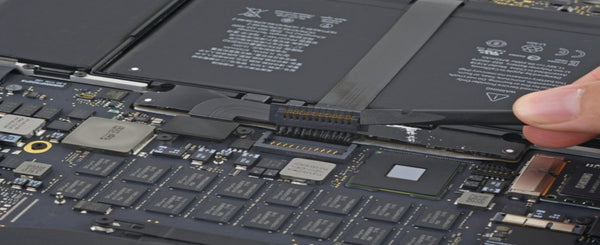
7.Remove the tape that covers the MacBook Pro connector cable near the cable strip.

8. Use the ZIF connector of a spudger to connect the cable and insert the triangle between the cable and the battery.
Carefully slide the cable into the assembly to separate it and physically secure it to the battery.
9. Use a screwdriver to remove the screws securing the battery. Note the length and size of the screws for later installation.

10. Slide the card to where the battery is and connect it to the MacBook Pro.

12. Slowly remove the old battery, install the new battery, make sure the position of each battery is aligned with each corner, then flatten it, and tighten the fixing screws on the circuit board;

KingSener 99.5Wh A1618 배터리 (Apple MacBook Pro 15인치 Retina A1398 2015년형용) 020-00079 MJLQ2LL/A MJLT2LL/A
13. Finally, connect the battery interface to the motherboard, paste the protective sticker on the circuit board, cover the back cover of the computer and tighten it. After installing the new battery, you can restart the computer.
If this article still doesn't help your laptop battery, you can buy a new battery at BatteryMall.com.
If you want to learn more about batteries, please visit:BatteryMall.com/blogs/support.

댓글 0개