
When your HP laptop battery no longer holds a charge, knowing your exact battery model number is crucial to purchasing a compatible replacement. In this guide, you’ll learn two effective methods to identify the correct HP battery model, whether you're looking for a quick check or a precise part number.
Check Battery via Laptop Model Number
The easy way: Select a compatible battery on the bottom of the computer or in the control panel based on your HP notebook model.
The exact method: Remove the laptop's bottom case and look at the battery model itself.
Follow these steps on HP laptops:
1. Open the start menu.
2. Click Settings.

3. Select System.

4. Scroll down the left pane and click About.
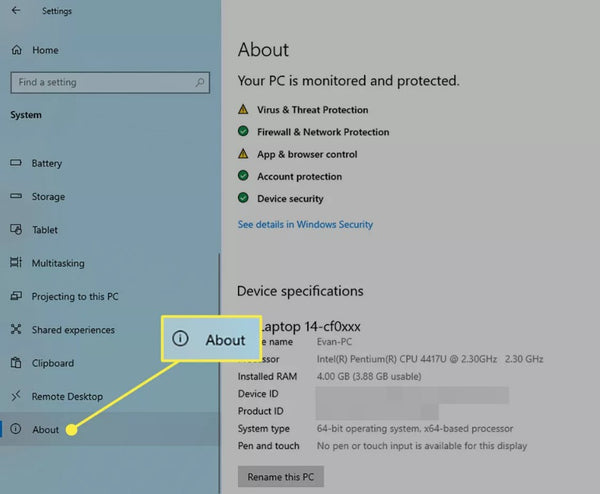
5. Your model number will appear under Device Specifications.


HP Pavilion DV4/DV6 MO06 62Wh Battery Replacement
Once you find the model number, you can search for the model number and "battery" at batterymall.com. Alternatively, you can use the tools on the HP website to get the information you need.
1. Navigate to the HP Notebook Battery Finder page.
2. At the top of the menu, click the tab for the laptop series you own.

3. Find your specific type of laptop in the left column and note the corresponding item in the "Compatible Batteries" section next to it.

4. Search for that type of battery in the online store of your choice.

HT03XL Battery for HP Pavilion 14-CE 15-CS 15-DW — 11.55V 41.7Wh
If you plan to replace the battery yourself, you can purchase it at BatteryMall.com after confirming the battery model, and we will also provide steps and videos for replacing the battery.
This method is more risky than the previous method, so it should only be used if you are confident in removing the panel.

Simple steps to replace the battery:
1. Shut down your computer and unplug the charging cable and any attached devices (if applicable).
2. Turn the laptop over.
3. If necessary, carefully remove the rubber feet to expose the screws.
If your laptop has rubber strips, remove them slowly and carefully; they tear easily.
4. Remove all screws that attach the backplane to the laptop. This hardware usually requires a 00 Phillips screwdriver.
(Please keep the removed screws)
5. If necessary, use a thin plastic tool to carefully pry open the bottom plate.
6. Locate the battery, which is on the same side of the computer as the charging port.
7. Model and power rating information should be printed directly on the battery; note this information and look for a battery of the same type or size on BatteryMall.com.
If this article still doesn't help your laptop battery, you can buy a new battery at BatteryMall.com.
If you want to learn more about batteries, please visit:BatteryMall.com/blogs/support

1 comment
PLease can you supply a battery for HP Laptop Serial number CND5347YYB and battery number 746641-001
ct 6FAPCC4FD8TG9M